Christmas Seamless Patterns - Cute Deer
If you're designing holiday materials—whether for a boutique gift wrap line, a seasonal email campaign, or custom home décor—you need patterns that feel festive, cohesive, and effortlessly professional. Christmas Seamless Patterns - Cute Deer delivers exactly that: a hand-crafted, illustrator-built collection where charm meets technical precision.
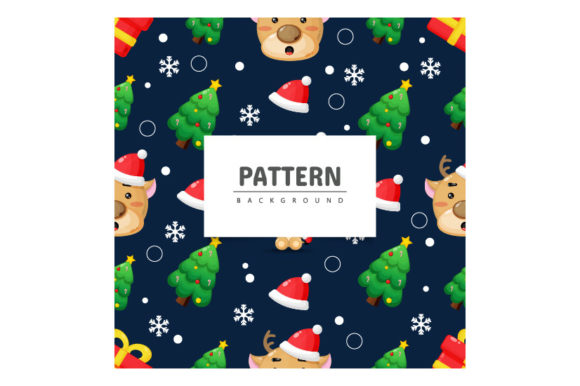
These aren’t generic clipart repeats. Each pattern is built from original vector artwork in Adobe Illustrator—designed with intentional spacing, balanced scale, and thoughtful negative space so the deer motifs nestle together without visual clutter. The result? A true seamless tile that flows endlessly across any surface, whether printed at 36 inches wide on fabric or scaled down to 120 pixels for a website background.
Why Seamless Matters—Especially for Deer
A seamless pattern doesn’t just look polished—it saves hours of manual editing. With Christmas Seamless Patterns - Cute Deer, the repeat point is mathematically accurate and visually invisible. No awkward gaps. No misaligned antlers. No “stitch lines” between tiles. That’s because every element—the frosted pine sprigs, the minimalist deer silhouettes, the subtle snowflakes—is anchored to a consistent grid and tested across multiple tile sizes (4×4", 8×8", 12×12") before final export.
The deer themselves are drawn with warmth and restraint: rounded ears, soft muzzle curves, gentle posture—not cartoonish, not overly stylized, but quietly expressive. They’re designed to read clearly at small sizes (think greeting card borders) and retain detail at large scales (think wallpaper murals). That balance comes from deliberate stroke weight variation, strategic simplification of fur texture, and consistent line continuity across all anchor points.
What’s Inside the Package—and Why It Works
You receive two core assets:
- EPS files — Fully editable vector sources. Open them in Illustrator, adjust colors in seconds using Global Swatches, resize infinitely without pixelation, or isolate individual deer to reposition or recolor. You can even ungroup layers to modify antler thickness, swap out background elements, or add custom typography directly into the tile.
- JPEG preview — A high-res (300 DPI), accurately color-profiled reference image. Not just for previewing—it’s production-ready for quick web use, social media banners, or client mockups when vector support isn’t available.
No fonts are embedded (to avoid licensing issues), no raster effects are baked in (so shadows or glows remain editable), and all clipping masks and compound paths are named logically—“Deer_Group”, “Snowflake_Layer”, “Background_Tile”—so collaborators can jump in without a style guide.
Real Uses Across Real Workflows
This isn’t just “nice to have.” It’s built for action.
A textile designer in Portland uses the EPS file to map the pattern across a 54" wide cotton sateen roll—adjusting the tile repeat to match her printer’s minimum repeat requirement (7.5") without distorting proportions. She changes the base green to a muted sage using Illustrator’s Recolor Artwork tool, then exports CMYK separations in under two minutes.
An educator in Toronto prints the JPEG preview onto cardstock, cuts it into puzzle pieces for a December geometry lesson on symmetry and tessellation—students physically rotate and align tiles to discover how the deer motif repeats across axes.
A freelance stationery designer drops the pattern into InDesign as a master page background for holiday invitations. Because it’s vector-based, it stays razor-sharp when exported to PDF/X-4 for premium letterpress printing—even behind translucent vellum overlays.
A Shopify store owner applies the JPEG version as a subtle background on her product pages during December. It adds seasonal warmth without competing with product photos, and loads fast thanks to its optimized 1200×1200 px size and sRGB profile.
Editing Without Headaches
“Very easy to edit” isn’t marketing speak here—it’s structural. All strokes use basic caps and joins (no complex brushes), fills are flat or linear gradients only (no mesh or opacity masks), and there are zero embedded images or linked assets. If you’ve used Illustrator for more than a few hours, you can recolor the entire pattern in under 60 seconds:
- Select all with Ctrl+A (or Cmd+A on Mac)
- Open Recolor Artwork (Edit > Edit Colors > Recolor Artwork)
- Drag the color wheel to shift from classic red/green to navy/cream, terracotta/ivory, or charcoal/silver
- Click OK—done.
Need monochrome? Convert to grayscale in Illustrator, then adjust brightness per layer—not globally—so the deer retain contrast against the background. Want motion? Copy the tile, offset it slightly, and apply a low-opacity blend mode for a layered depth effect—no plugins required.
Where It Fits—and Where It Doesn’t
This pattern excels where warmth, approachability, and quiet sophistication matter: children’s book endpapers, eco-friendly wrapping paper for artisanal brands, classroom door decorations, wedding welcome signage with a winter woodland theme, or subtle UI backgrounds for holiday-themed apps.
It’s less suited for ultra-minimalist luxury branding (where stark negative space dominates) or high-energy youth campaigns (where bolder icons or animation would carry more weight). And while it scales beautifully, avoid stretching it beyond 300% in Illustrator if you plan to add fine text over it—antler tips may begin to blur at extreme zooms unless you re-rasterize at higher resolution.
Also worth noting: the deer are intentionally gender-neutral and culturally inclusive in design—no holiday-specific iconography like Santa hats or religious symbols—so they adapt smoothly across secular, interfaith, or international contexts.
Final Thought: Design Should Serve, Not Slow You Down
In a season full of deadlines and diminishing bandwidth, Christmas Seamless Patterns - Cute Deer removes friction—not creativity. It gives you a foundation that’s already balanced, tested, and production-ready, so your energy goes into storytelling, client collaboration, or craft—not troubleshooting alignment or rebuilding repeats from scratch.
If you're evaluating holiday design assets this season, ask yourself: Does it save time *and* elevate quality? Does it work across my current tools—and the ones I’ll adopt next year? Does it reflect the tone my audience trusts? For many designers, educators, and small business owners, the answer starts with these deer—and ends with fewer revisions, faster approvals, and more joyful making.
Please contact us if you have any questions. Thank You.