Cute Baby Patterns: Playful & Professional Design Assets
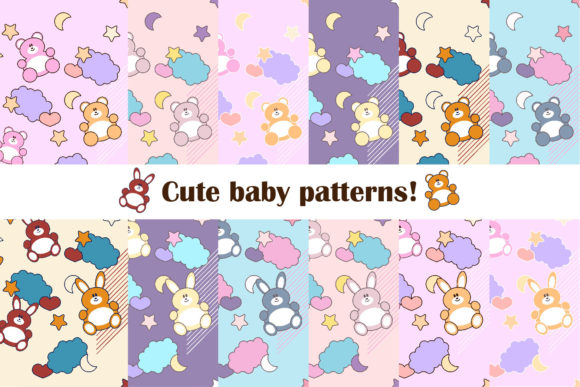
Twelve original, high-resolution patterns—each designed with warmth, charm, and versatility in mind. Cute Baby Patterns isn’t just another clipart pack or generic stock set. It’s a curated collection of 24 total JPG files: 12 at 3000×3000 pixels and 12 at 6000×8000 pixels—both at crisp 300 DPI—so you can scale confidently for print or digital use without compromise. At its heart are soft-edged teddy bears and bunnies, rendered in gentle, coordinated color palettes that avoid oversaturation while retaining visual appeal.
Why These Patterns Stand Out for Real Projects
Many baby-themed assets lean heavily into cliché: pastel overload, overly literal motifs, or low-res scaling that breaks on packaging or large-format prints. Cute Baby Patterns avoids those pitfalls by balancing simplicity with detail—rounded shapes, subtle texture hints, and intentional negative space that keeps designs breathable and adaptable. The consistent 300 DPI resolution means these aren’t just screen-friendly; they’re production-ready for fabric printing, nursery wall decals, board book layouts, or boutique product labels.
Because each pattern repeats cleanly and predictably, designers can easily tile them across surfaces—whether building a custom wrapping paper PDF for an Etsy shop or generating a seamless background for a pediatric clinic’s patient education handout. No need to wrestle with alignment or distortion: the repeat logic is built-in and tested.
Creative Applications Across Roles and Platforms
Different users bring different goals—and Cute Baby Patterns supports that diversity without requiring heavy editing:
- Small business owners (e.g., handmade baby blanket makers) use the 6000×8000 versions to mock up product tags, care instruction cards, or Instagram story templates—keeping branding cohesive without hiring a designer.
- Educators and early childhood specialists integrate the 3000×3000 files into printable activity sheets—think matching games, counting cards, or emotion charts—where clarity and gentle visual cues matter more than flash.
- Freelance designers and marketers layer the patterns under transparent text boxes in Canva or Figma to create branded email headers, social media banners, or pitch decks for parenting-focused clients—adding personality without cluttering the message.
- Publishers and indie authors apply the patterns as endpaper textures or chapter dividers in baby journals, milestone trackers, or bilingual first-word books—enhancing tactile and visual continuity between pages.
Even hobbyists benefit: one user printed the bunny pattern on iron-on transfer paper and applied it to plain cotton onesies—no sewing machine required, no pixelation visible even up close.
Adapting for Audience and Context—Without Starting From Scratch
A pattern that works for a hospital’s newborn welcome kit won’t always suit a gender-neutral subscription box—but Cute Baby Patterns gives you flexibility within consistency. For example:
- Swap warm-toned bears for cooler palettes using basic hue/saturation adjustments in free tools like Photopea or GIMP—no redesign needed.
- Combine two patterns (e.g., bear motif + bunny border) in a layout app to create custom borders for birth announcements or baby shower invites.
- Use the 3000×3000 files as base layers in Procreate or Affinity Designer, then add hand-drawn annotations or localized text for multilingual educational posters.
The key is treating each file as a starting point—not a final solution. That mindset helps maintain originality while saving hours of conceptual work. You’re not copying a trend; you’re responding to your audience’s needs with intention and efficiency.
Keeping Output Clear, Consistent, and Audience-Friendly
Clarity starts with restraint. When applying Cute Baby Patterns, ask: What action do I want the viewer to take? A busy background behind dense text reduces readability—so use lighter-color variants (like the pale mint bear or oatmeal bunny) for body copy areas, and reserve bolder versions (navy bear, terracotta bunny) for headers or accents.
Consistency comes from limiting variation—not eliminating it. Pick one bear pattern and one bunny pattern per project, then vary only scale or placement. That builds visual rhythm without confusion. One educator reported using just three of the 24 files across her entire preschool curriculum—yet parents consistently commented on how “calm” and “unified” the materials felt.
For audience-friendliness, consider accessibility: avoid pairing light-pattern backgrounds with light-colored text. Test contrast using free tools like WebAIM’s Contrast Checker—even small tweaks (e.g., darkening text from #CCCCCC to #555555) make a measurable difference for caregivers reading on phones or tablets.
Realistic Ideas You Can Launch This Week
You don’t need a full rebrand or product line to begin. Here are grounded, low-lift ways to start:
- Create a printable “First Year Milestones” tracker: Use one bear pattern as the header background, add simple checkboxes and date fields in a clean sans-serif font, export as PDF—done in under 30 minutes.
- Refresh your Etsy shop banner: Overlay the 6000×8000 bunny pattern at 15% opacity behind your logo and tagline—softens branding without losing professionalism.
- Design a set of four social media posts for a baby massage workshop: match each post to a different color variant (e.g., lavender bunny for “calm”, sage bear for “soothe”)—reinforces theme through palette, not just words.
- Print a 24×36” poster for a daycare waiting area: center one pattern, add a short, reassuring message (“You belong here”) in large, legible type—no illustration skills required.
Each idea uses what’s included—no extra plugins, subscriptions, or design expertise. The value isn’t in complexity; it’s in reducing friction between intention and execution.
Final Thought: Tools Should Serve Your Work, Not Define It
Cute Baby Patterns doesn’t promise viral growth or overnight success. What it does offer is reliability: predictable quality, thoughtful sizing, and motifs that resonate without stereotyping. Whether you’re sketching a concept on paper or finalizing a client presentation, having 24 trusted assets ready to deploy means more time for strategy, connection, and refinement—and less time troubleshooting resolution errors or licensing limits.
That kind of practical support doesn’t replace creativity. It protects it.